




I approached GoLive TV as a practical way to watch live television from a phone rather than as an all-in-one entertainment service. It is a free app in the video players and editors category, developed by Smart Technology Global, and its purpose is straightforward: give you a smart IPTV player for live TV viewing. That distinction matters from the first tap. The app is a player, so the quality of your experience depends not only on the application itself but also on the IPTV source you use with it.
For someone trying IPTV for the first time, that can sound more complicated than it really is. I found the basic idea easy to understand once I stopped expecting a traditional television service. GoLive TV is not the same as opening a streaming platform with a ready-made catalog. Instead, it is better viewed as the screen and control center for live-TV content that you already have access to. If that matches what you need, the app can be a convenient addition to a phone or tablet. If you want channels to appear automatically with no setup, a conventional streaming service may be a better fit.
What GoLive TV feels like before you start watching
The first thing I would tell a new user is to set realistic expectations. The store summary presents it as a way to watch live TV anytime with a smart IPTV player, and that is the right general picture. You are installing a viewing tool, not necessarily subscribing to a television package through the app. The free download makes it easy to try, while optional in-app purchases range from $4.99 to $19.99 per item. I would therefore look at the purchase screen carefully and understand what each option unlocks before confirming anything.
The app has an Everyone content rating, which makes it approachable for households that want a simple live-TV player. It requires Android 8.0 or later, so it should work on many still-used devices, although older phones may feel less comfortable when handling long channel lists or high-quality streams. The current version is 1.0.21, and the app has passed the one-million-install mark. Its average rating is 4.3 from around 2.4 thousand ratings, which suggests that many people find the basic concept useful, but I would not treat that number as a guarantee that every IPTV source will behave perfectly.
My strongest early impression is that GoLive TV is most valuable when you already know what you want to watch and have a legitimate source ready. It can make live channels easier to access in a bedroom, kitchen, office, or while traveling, provided your network and source support that use. It is less suitable for somebody who wants recommendations, original series, cloud recording, or a large on-demand library presented immediately after installation.
Preparing the right source before opening the player
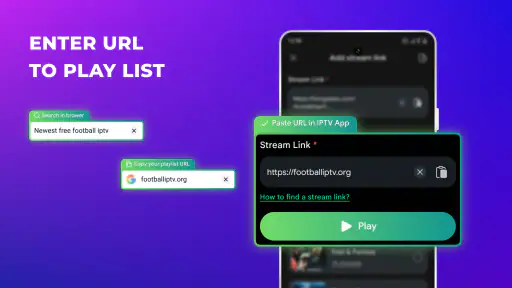
The smoothest first experience starts before installation. I recommend having your IPTV details nearby rather than downloading the app and then searching through old messages or documents. Depending on the service you use, those details may be supplied as a playlist, a portal address, or another login method. GoLive TV cannot make an incomplete source complete, so copying the information carefully is more useful than repeatedly restarting the app.
This is also where I would make an important safety choice: use only a television source you are entitled to access. A player can display content, but it does not turn an unlicensed channel source into a legitimate one. When a playlist comes from an unfamiliar website or message, I would avoid entering sensitive account details until I understand who operates it. That small amount of caution is especially worthwhile on a device used for banking, email, or private photos.
For a first test, I would choose a short, trusted playlist rather than importing every channel available. A smaller starting point makes it easier to tell whether the connection works, whether channel names are readable, and whether the source itself is reliable. This is one of the less obvious ways to reduce frustration: if hundreds of entries load at once, a single broken channel can make the entire setup feel defective even when the player is working normally.
Setting up GoLive TV without making the process harder
After installation, I would move through the setup slowly and read each field instead of guessing. IPTV services often use similar-looking terms for different connection details, and placing a playlist address in a portal field can lead to an error that looks mysterious. The practical rule is simple: match the information you received to the connection method the app presents, then check every character before submitting it.
Pay special attention to punctuation, capitalization, and spaces added during copying. A single missing symbol can prevent a playlist from loading. If the source uses credentials, I would type them rather than relying on a password that may have been copied with an extra space. This is not glamorous advice, but it is the difference between a quick first success and an hour spent blaming the wrong component.
Once the source is accepted, give the app time to organize the channel list. I would not immediately press every option or repeatedly reload the screen. IPTV lists can contain inactive entries, duplicate names, or channels whose guide information is incomplete. The useful first question is not whether every item looks perfect; it is whether one known channel opens and plays consistently.
If the app offers a choice between several sources or lists, I would begin with the one I use most often. That creates a clear baseline. Later, you can add other sources or explore additional sections if your setup supports them. Starting with one familiar channel also makes it easier to identify whether a problem comes from GoLive TV, the source, or the network.
The first meaningful success: opening one dependable channel
For me, the first real milestone is not importing a large library. It is opening one dependable live channel, letting it play for a few minutes, and confirming that the controls respond normally. Choose something you already recognize, preferably a channel that is usually available rather than a temporary event stream. If that channel plays, you have proved the essential path from installation to viewing.
A useful everyday scenario is watching a news channel while preparing breakfast without turning on the main television. Another is keeping a live sports or public broadcast stream available on a tablet while someone else uses the family TV. In these situations, the value is convenience and flexibility, not a cinematic interface. I found the player concept most appealing when I treated it as a secondary screen that could follow me around the home.
Once a channel is playing, test the basics before changing anything else. Pause briefly if the source supports it, return to the channel list, and open the same channel again. This simple check tells you whether navigation feels dependable and whether the stream reconnects after leaving playback. It also gives you a better idea of how much patience the app requires during normal use.
When playback stutters, I would resist the temptation to assume the application is at fault. Live IPTV depends on several moving parts: the source server, your internet connection, the device, and the player. Try a different known channel and compare the behavior. If only one channel fails, the source may be the issue. If everything struggles, check your connection and device conditions before changing the app’s configuration.
Why channel lists can be more confusing than the player
The most common confusion for a first-time user is the difference between a channel appearing in a list and a channel being available to watch. A playlist may contain old entries, regional restrictions, temporary streams, or names that do not clearly describe the actual content. Seeing a long list can create the impression that all channels are equally dependable, but that is rarely how IPTV works in practice.
I would build a personal shortlist gradually. After testing several entries, remember the channels that open quickly and remain stable. If GoLive TV lets you organize or mark preferred items in your particular setup, use that capability instead of scrolling through the entire source every time. A compact personal selection is more useful than a huge list you never trust.
Another point that can confuse people is guide information. Channel schedules may come from the IPTV source rather than from the player itself, so missing or inaccurate program details do not automatically mean that live playback is broken. I would judge the app first by whether it opens the stream I selected, then judge the source by the accuracy and completeness of its guide information.
Names can also be inconsistent. The same station may appear with a country label, a language tag, a resolution note, or a provider-specific abbreviation. Instead of trying to understand every label immediately, I would test a few likely entries and create a simple mental map. This makes the second session much faster than attempting to decode the entire list in one sitting.
Handling playback friction in a sensible order
When a stream refuses to load, my troubleshooting order would be deliberately boring. First, I would try another channel from the same source. Next, I would check whether the device is connected properly and whether other online video plays normally. Then I would reopen the player and recheck the source details. Only after those steps would I consider removing and adding the source again.
This order prevents a common mistake: deleting a working setup because one channel is temporarily unavailable. Live television is more sensitive to server congestion and source changes than downloaded video. A channel that worked yesterday may fail today without any change to the player. Keeping that distinction in mind makes GoLive TV feel much less unpredictable.
Older hardware can introduce another trade-off. Even with Android 8.0 compatibility, a device may have limited memory, a tired battery, or difficulty handling demanding streams. If the app opens but playback is unstable, close other video-heavy applications and test again. I would also avoid judging the experience from a weak mobile connection alone. A player intended for live television needs a steadier connection than a short clip that can buffer ahead.
There is a practical privacy habit I recommend as well: avoid entering IPTV credentials on shared devices unless you are comfortable with other users having access to that account. If you use GoLive TV in a family room, consider who can open the app and view the configured sources. The player’s convenience is strongest when the device and account are under your control.
How it compares with familiar alternatives
Compared with a traditional live-TV streaming service, GoLive TV gives you more responsibility. A conventional service usually manages the channel catalog, account system, guide, and playback environment in one place. That is easier for people who want to sign in and start watching. GoLive TV can be more flexible for users who already have a preferred IPTV source, but the setup and reliability of that source remain part of the experience.
Compared with a general media player, its appeal is more focused. A general player may handle local files, network videos, or many formats, while GoLive TV is aimed at the live-channel workflow. If your goal is to watch downloaded movies or edit clips, this is not the tool I would choose. Its value appears when your main task is moving through live television rather than managing a broad personal media library.
It also differs from free broadcaster apps. Those apps can be excellent when you only need one network or one region, and they often provide a more polished presentation for their own content. GoLive TV becomes more interesting when you want one place for a compatible IPTV source and do not want to jump between several individual broadcaster applications. The trade-off is that the unified player may not provide the same level of editorial discovery or service-specific support.
For a first-time user, I would choose GoLive TV when I already have a trustworthy IPTV source and want a lightweight viewing route on Android. I would skip it when I expect a ready-to-watch catalog, detailed recommendations, or guaranteed availability for every listed channel. That is not a criticism of the app; it is simply the difference between a player and a complete television subscription.
Who will get the most from the app
I think the best audience is someone who watches live channels regularly and values access from more than one screen. It can suit a person who wants television on a phone during a commute break, a household that needs a second viewing device, or an IPTV user who prefers a dedicated player instead of opening a browser. It may also appeal to people who already understand playlists and want a straightforward place to test a source.
It is less convincing for viewers who mainly watch on-demand shows. If you spend most of your time choosing a film, resuming a series, or browsing personalized recommendations, the IPTV player format may feel like extra work. The same applies if you dislike troubleshooting. Even a well-designed player cannot repair an expired playlist, an overloaded source, or a channel that has gone offline.
The free entry point makes experimentation reasonable, but I would not purchase anything until the basic workflow is successful. Install the app, connect a legitimate source, open a familiar channel, and use it through a normal viewing session. Only then can you decide whether an optional purchase is worthwhile for your habits. This approach keeps the decision based on actual usefulness rather than on the promise of a larger or smarter setup.
My next-step routine after the first session
After getting one channel working, I would spend the next session improving convenience rather than adding more content. Test the channels you genuinely watch, remove or ignore unreliable entries, and note which categories or labels help you find them quickly. A tidy personal routine will make the app feel faster even if the underlying source remains unchanged.
I would also test GoLive TV at the time and place where I expect to use it most. A setup that works well on home Wi-Fi may behave differently on mobile data or in a room farther from the router. That test answers a more useful question than a quick launch: can the app support the viewing situation I actually care about?
Keep your source details in a secure place and update them only through the provider you trust. If a channel disappears, check the source before rebuilding the entire app. If playback is stable but navigation is inconvenient, refine your shortlist. These small habits are the difference between treating IPTV as a frustrating technical project and using it as an ordinary part of your viewing routine.
My overall view is positive but measured. GoLive TV gives Android users a free way to work with live IPTV, and its one-million-plus installs show that the format has found a substantial audience. The app is most successful when you understand what it is: a viewer for your live-TV source, not a replacement for that source. With a legitimate playlist, a stable connection, and a little patience during setup, it can become a handy second-screen option. Without those ingredients, a traditional streaming app will probably offer a simpler path from opening the app to watching something.
For a first-time user, my recommendation is to begin small, verify one reliable channel, and judge the experience over an ordinary evening rather than during a rushed installation. If that first meaningful action feels easy and the channels you care about remain stable, GoLive TV is worth keeping. If you want effortless discovery and guaranteed programming, I would choose a full streaming service instead. That clear distinction makes the decision much easier, and it is the fairest way to approach this app from the start.


